


 PsFiles Designer
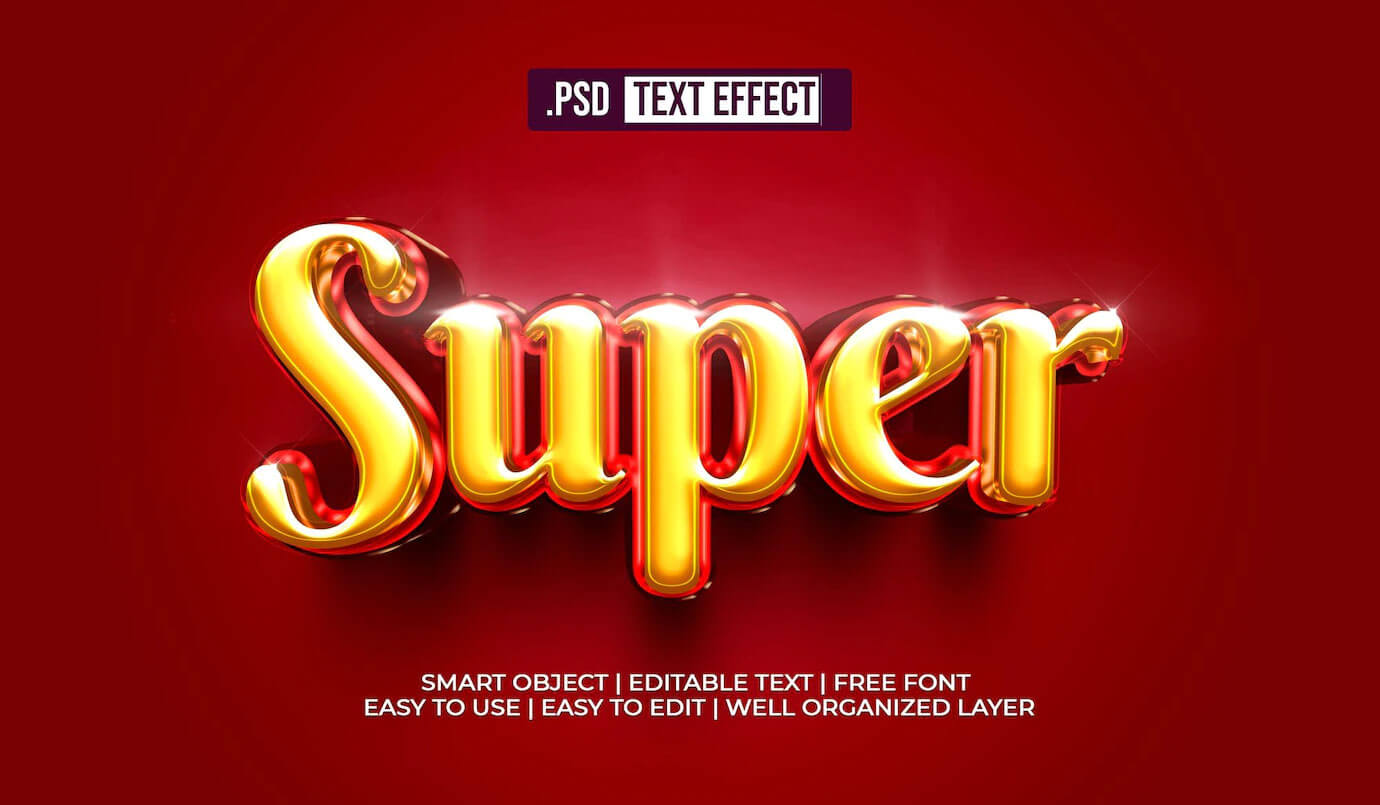
Gold text never goes out of style. Whether it’s a luxury brand identity, a wedding invitation, a music award graphic, or a YouTube channel logo — a beautifully rendered gold text effect immediately signals quality, prestige, and craftsmanship. This free Super 3D Gold Shine Text Style Effect PSD delivers that premium golden look with a deep 3D dimension and brilliant surface shine that catches the eye at any size.
Download it free, open it in Photoshop, type your text, and you have a professional gold 3D text style in under two minutes.
What Is the Super 3D Gold Shine Text Effect?
This is a high-quality, fully editable Photoshop PSD featuring a gold text effect with genuine 3D depth and a brilliant multi-layered shine effect. Unlike flat golden text, this PSD uses layered bevel, emboss, gradient overlay, and highlight techniques to create the appearance of real molded gold — with surface gloss, edge highlights, and dimensional depth.
The result is a text treatment that looks like it was designed for a luxury product launch, a championship trophy, or a Hollywood film title sequence.
What’s Inside the PSD File
- Fully organized, layered PSD file
- Smart Object layer — edit text instantly
- Multi-layer gold effect: bevel, emboss, gradient, specular highlight
- Deep 3D extrusion giving real dimensional depth
- Shiny surface gloss effect with realistic light sourcing
- High-resolution output — perfect for print and web
- Dark background included and separately layered
- Compatible with Photoshop CS6, CC 2018, CC 2019, CC 2020, CC 2021, CC 2022, CC 2023, CC 2024, CC 2025
- To use these PSD files you need Adobe Photoshop
File Details
| Property | Detail |
|---|---|
| File Format | .PSD (Adobe Photoshop) |
| File Szie | 24 MB |
| Resolution | High Resolution |
| Editable Text | Yes — Smart Object |
| Effect Style | 3D Gold Shine / Glossy Metallic |
| License | Free for personal and commercial use |
| Location | Freepik |
| Compatible With | Photoshop CS6, CC 2018–2025 |
How to Edit the 3D Gold Text Effect in Photoshop
Changing the text in this PSD is quick and easy:
- Download and open the PSD file in Adobe Photoshop
- Look for the Smart Object layer in the Layers panel — it has a small overlay icon
- Double-click the Smart Object to open the text editing document
- Delete the existing text and type your own
- Choose your font — bold, heavy-weight fonts show the 3D gold effect best
- Save and close the smart object file (Ctrl+S / Cmd+S)
- Return to the main PSD — your text now has the full gold 3D shine effect applied
- Export your finished design as PNG (for transparency) or JPG (for solid background)
The smart object system ensures the effect is 100% non-destructive. You can experiment with different fonts and text freely without any loss of quality.
Font Recommendations for Gold 3D Text
The gold shine and 3D depth effect looks best on fonts with thick, substantial letterforms. Here are the best choices:
- Trajan Pro — the classic choice for luxury, films, and awards
- Cinzel — free on Google Fonts, elegant serif with great gold weight
- Bebas Neue — bold condensed sans-serif, great for modern gold logos
- Anton — heavy display font, free, works brilliantly for the 3D depth
- Playfair Display Black — sophisticated serif with high contrast strokes
- Impact — simple and powerful, maximum gold coverage
Avoid thin or light-weight fonts — they lose the 3D depth and gold shine clarity at smaller sizes.
Best Uses for This Gold 3D Text Effect PSD
Gold text is one of the most versatile design treatments across industries. Here’s where this PSD gets used most:
- Logo design and brand identity — luxury brands, fashion labels, law firms, real estate
- YouTube channel art and thumbnails — award announcements, “Gold Play Button” style graphics
- Wedding stationery — invitations, menus, place cards, thank-you cards
- Music and entertainment — album covers, artist names, award show graphics
- Certificates and diplomas — graduation, achievement, excellence awards
- Social media content — announcement posts, special offer graphics, celebrations
- Game design — title screens, achievement badges, in-game trophy interfaces
- Sports graphics — championship announcements, gold medal posts, trophy reveals
- Religious and cultural events — festive gold text for Eid, Christmas, Diwali, New Year
- Product packaging mockups — premium product labels, gift box typography
The Difference Between Good and Great Gold Text Effects
Many free gold text PSDs online look flat or fake — like a yellow gradient was thrown on top of plain text. The difference between those and this comes down to three things:
1. Real surface reflection simulation. Gold has a complex, multi-tonal surface. It reflects highlights very brightly in some areas and drops to deep amber or even near-black in shadows. A flat gradient doesn’t capture this.
2. 3D extrusion depth. Real gold objects have physical depth — a coin, a trophy, a printed foil label all catch light differently on their faces versus their edges. The 3D extrusion in this PSD adds that critical sense of physical weight.
3. Specular highlights. The sharp white hotspot on the surface of polished gold — that single bright point where the light source is directly reflected — is what makes gold look genuinely metallic rather than painted yellow. This effect includes those specular highlights precisely placed.
The combination of all three is what gives this PSD that “premium product” look.
Frequently Asked Questions
Can I change the gold color to silver or rose gold?
Yes. The gold color is controlled through gradient overlay layer styles. Change the gradient colors to silver/gray tones for a chrome/silver effect, or shift to pink-gold tones (#E8B4A0 range) for a rose gold look.
What resolution is the output?
The PSD is high resolution and suitable for both digital use and print. For social media use it at 72 DPI; for print projects use 300 DPI.
Can I use this for a client’s commercial project?
Yes — this PSD is fully free for personal and commercial use including client work, advertising, print production, and merchandise.
Why does my text look different from the preview?
Font choice has the biggest impact. If you’re using a thin or regular-weight font, the gold effect won’t be as prominent. Switch to a bold or heavy font weight for the full gold 3D impact.
Does this work with Photoshop Elements?
Photoshop Elements has limited smart object and layer style support. This PSD is optimized for full Adobe Photoshop (CS6 or CC). It may open in Elements but the layer effects may not render correctly.
Is the background removable?
Yes. The dark background is on its own layer. Simply hide or delete it to get the gold text on a transparent background, then export as PNG.
Download the Super 3D Gold Shine Text Effect PSD Free
Click the download button above for instant free access. No registration or email required.
Looking for more gold text effects? Browse our complete Photoshop Text Effects Collection — we have over 50 free text effect PSDs including gold, chrome, neon, 3D, vintage, and more.