



 AbduDzyn
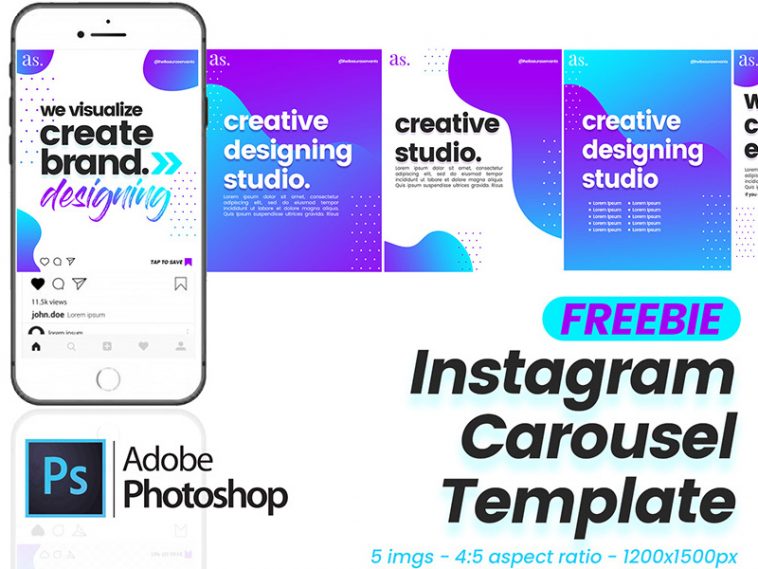
A clean and stylish free Instagram carousel PSD template for creative digital brand agencies. This free PSD Instagram carousel template created and shared by Aura Servants.
Free Instagram Carousel PSD Template — Multi-Slide Social Media Design
Create scroll-stopping Instagram carousel posts with this free multi-slide PSD template. Designed for brands, influencers, and social media managers who need professional-looking carousel content without starting from scratch.
What’s included:
- Multi-slide carousel PSD template
- Instagram-optimized dimensions (1080x1080px per slide)
- Fully editable text, colors, and images
- Consistent design system across all slides
- Compatible with Photoshop CS6 and above
File Info:
- Available Format: .PSD Format
- License: Free for personal and commercial use
- File Size: 36 MB
- Download file type: Zip
- Author: Aura Servants
- To use these PSD files you need Adobe Photoshop
Instagram carousel best practices:
- Hook slide (Slide 1) — Strong headline that stops the scroll. Ask a question or make a bold statement
- Content slides (Slides 2–8) — One key point per slide, keep text minimal
- CTA slide (Last slide) — Tell people to save, share, or follow
- Use consistent fonts and colors across all slides for brand recognition
- Add a small arrow or “swipe” indicator on slide 1 to signal it’s a carousel
Perfect for: Social media agencies, small business owners, Instagram influencers, coaches and educators, product launches, how-to and tutorial posts, listicle-style content, brand storytelling.
Frequently Asked Questions
What is the correct Instagram carousel size in 2026? Instagram carousels support square (1080x1080px), portrait (1080x1350px), and landscape (1080x566px). Square is most commonly used as it works in both feed and the explore page consistently.
How many slides can an Instagram carousel have? Instagram allows up to 20 slides in a single carousel post as of 2025. Most high-performing carousels use 5–10 slides.
Can I edit this template in Canva instead of Photoshop? This is a PSD file for Photoshop. For a Canva version, you would need to recreate the design in Canva’s editor. Alternatively, open the PSD in Photopea (free browser app) as a Photoshop alternative.